
EIQ-SmartPlateID Installation & Integration Requirements
For Professional CCTV Installers, Access Control Technicians, and IT Administrators
EIQ-SmartPlateID is EntranceIQ’s license-plate-as-a-credential system. It uses purpose-built SmartPlate cameras that read, identify, and authenticate registered vehicle plates in real time, sending secure credential events into the EntranceIQ Ecosystem via Wiegand output and encrypted cloud communication.
This document outlines the physical installation requirements, electrical/power guidelines, networking configuration, and integration steps necessary for a successful SmartPlateID deployment.
Camera Positioning & Mounting Requirements
Accurate license plate identification depends primarily on proper physical placement and optical alignment. All SmartPlateID cameras must follow these mandatory installation standards.
-
Mounting Height
Install cameras 8–10 feet above ground level for optimal viewing angle and collision avoidance. -
Curbside Placement
Cameras should be mounted on the curbside of the post, positioned no farther than the inside edge of the curb.
This prevents large vehicles (delivery trucks, vans, RVs) from striking the camera during wide turns. -
Setback Distance
Cameras equipped with optical zoom should be positioned approximately 45 feet back from the gate operator. -
Single Lane Capture
Each camera must capture only its assigned lane. Multi-lane or wide-angle captures are not acceptable.
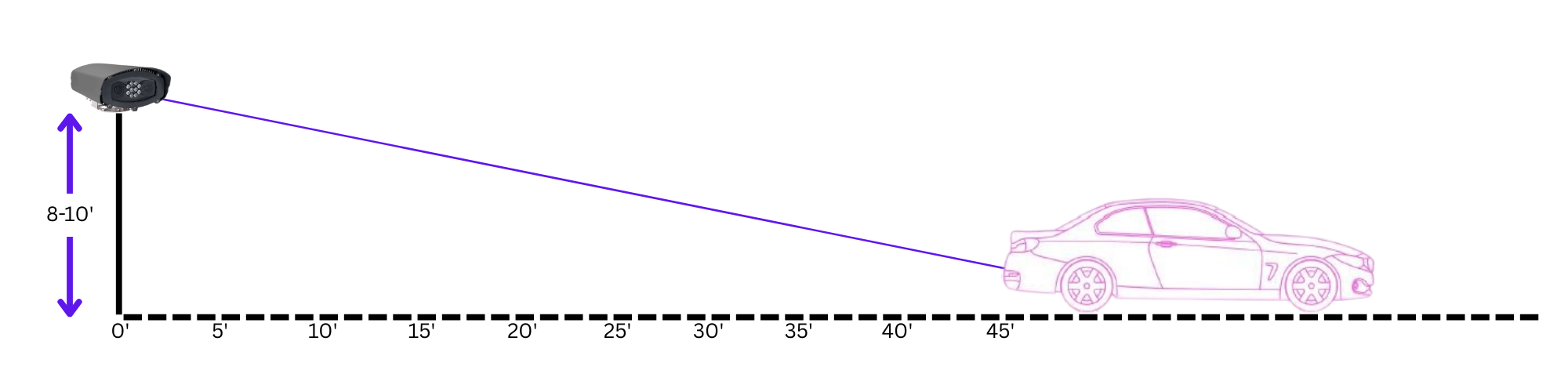
Required Optical Alignment
Aim the camera directly at the rear of the vehicle, centered on the lane.
Use optical zoom so the license plate fills a significant portion of the frame.
Avoid capturing adjacent lanes, opposite-direction traffic, or parking areas.
Why Proper Placement Is Critical
LPR systems interpret any visible plate in the frame. Improper mounting leads to:
- Cross-lane reads
- Incorrect vehicle associations
- Invalid access events
- Lower recognition accuracy
Correct positioning ensures each camera reliably captures its dedicated lane.
Network & Firewall Requirements
EntranceIQ establishes inbound TCP connections to each camera for configuration and management.
Required Firewall Rules
- Allow TCP inbound to each camera from the EntranceIQ system on the HTTPS port.
- Standard RTSP port: 443/tcp
- VLAN-segmented environments must allow RTSP communication across VLAN boundaries.
Multi-Camera Port Mapping (NAT, Remote Sites, Cellular Networks)
When cameras are installed behind NAT, LTE gateways, routers, or isolated networks, port mapping (port forwarding) must be used.
Recommended Mapping Scheme
If cameras are behind one public IP and must be reached from outside
So you’d need one of these HTTPS-only options:
Unique external ports per camera (still HTTPS)
-
-
-
Camera 1 → External 30443 → Internal 443
-
Camera 2 → External 31443 → Internal 443
-
Camera 3 → External 32443 → Internal 443
EntranceIQ connects to: -
https://PUBLIC_IP:30443 -
https://PUBLIC_IP:31443 -
etc.
-
-
Benefits
- Internal camera HTTPS settings remain standard
- Each camera receives a unique external access port
- Eliminates overlapping port conflicts
- Enables EntranceIQ to pull each stream independently
Note: EntranceIQ requires only inbound access to these ports—never outbound to our system.
SmartPlateID Camera → NAPCO CA-02 (Wiegand Connection)
The SmartPlateID camera provides a Wiegand output via its pigtail harness.
Typical Wiegand Wiring from Camera:
| Camera Wire | Function | Connect To CA-02 |
|---|---|---|
| Wiegand D0 | Data 0 | Reader D0 input |
| Wiegand D1 | Data 1 | Reader D1 input |
| Ground | Common | Panel GND |
Always verify manufacturer color codes before termination.
How the Access Logic Works
- Vehicle approaches lane.
- SmartPlateID reads license plate.
- Technology converts plate to programmed Wiegand credential.
- Credential is sent via D0/D1 to CA-02 reader input.
- CA-02 checks credential authorization (managed by EntranceIQ).
- If approved → panel activates relay output.
NAPCO CA-02 → Gate Operator (Strike/Relay Wiring)
CA-02 Relay Output Wiring
| CA-02 Terminal | Function |
|---|---|
| COM | Common relay contact |
| NO | Normally Open contact |
| NC | Normally Closed contact (not typically used for gate trigger) |
Per-Lane Design Best Practice
For each vehicle lane:
- 1 SmartPlateID camera
- 1 Dedicated CA-02 reader input
- 1 Dedicated relay output to that lane’s operator
This ensures:
- Lane-specific logging
- Proper direction control
- Accurate reporting
- No cross-triggering
Installer Checklist
Before leaving site:
- Wiegand format matches panel programming
- Ground continuity confirmed
- Relay time tested
- Gate cycles properly
- Plate test approved & denied scenarios verified
- Event appears in EntranceIQ logs
- Lane reporting accurate
Information Required by EntranceIQ
Provide the following for each camera:
- Camera name clearly identifying the field of view or monitored location
- Confirmed HTTPS port number
- Verified HTTPS access URL
- Confirmation that firewall rules permit inbound access from EntranceIQ to the camera and/or mapped ports
- Confirmation of active connectivity to the CA-02 panel
- Verification that EntranceIQ has access to the CA-02 panel
- Public IP address and associated port for the CA-02 panel